The Next Generation GUI (Part III)

following on from part I and part II

The Next GEN GUI Universe is a 3D GUI. The GUI interprets the computer in graphical form using a solar system to provide a structured approach to navigating the data held on a computer. The central core is the hardware, followed by the Kernel, Shell and Editors, and finally the programs. Clicking on any ring or planet will bring up a window showing the data stored in that category. The drafts below give an early indication of what this GUI could look like.

The file system is visually represented as is was designed. Using Unix as the example, I’ve ordered the file system as the structure is drawn, replacing the simplified circle within a circle, with a three dimensional solar system. The user can now access any part of the structure, provided they have permission.

Traditional input devices like the mouse may not suffice when we begin to look at the future GUI’s. I predict that the mouse will evolve into a gyroscopic device similar to the Wii remote, including feedback response features. Remember that this new GUI is being designed for the home, and as a result we do not want to be bound to a desk in order to use it. We are therefore obligated to design it not to need a traditional keyboard and mouse.

Clicking on any part of the operating systems structure, will rotate that structure to the centre of the screen and bring up a menu offering further information. Initially I suggest a traditional view of the data in a tabled structure. But in future I believe this view will be radically altered to display information in a naturally logical and organic way. The logic I mention may stem from initial psychological tests carried out on the user before their logon details were created. Allowing the system to order, categories and display information uniquely tailored to each users own understanding of how that data should be represented.

Going forward with this concept, i can see each computer on the network graphcially rendered as a solar system, connected by artifical gravitational forces, depending on their real world physical distances.

Wordpress upgrade 2.5

Upgraded to Wordpress 2.5 which has a slight issue with K2 theme. Follow these instructions to troublehshoot the issue - http://wordpress.org/support/topic/164296 If you are experiencing the same. Also a minor issue with the view site button due to me not have a writen blog title, again a fix has already been found - http://wordpress.org/support/topic/164596 . I’ve implemented a temporary fix by adding a “^” to the title.

Let me ask you a Question?

“If you could, would you try to shape the world or leave it to be shaped by others?”

To help you decide i’ ll lay out the possibilities: If you answer yes what would you shape it into? That’s important, their isn’t any point in saying yes without having the vision of what you’d like the world to be like. If you don’t have that vision your answer is actually no (you’re brain has blown a fuse, please take it to your nearest neurosurgeon for a tune up). Also consider whether others are aware of this choice and would their vision be different?

A no answer, or a yes without vision, would indicate you taking a back seat, either unable or unwilling to add a vision to the potential multitude existing in the world you live. Naturally you wouldn’t be represented in the global affairs, which deal with creating said visions (one less vision to deal with).

Is this Important?

Read on and make your own mind up. Here’s a quick recap:

“Choosing yes means joining a chorus of other saying yes, your vision is represented but not necessary equally. Power and money still rule. Choosing no means you may have a vision, but are unable or unwilling to let it see daylight.”

Note: This isn’t a question of good versus bad visions, we are only interested in the possibilities and outcomes we will all experience in relation to making such a choice.

Yes requires a belief that the world can be shaped by you. Power and money makes this easier and some of you will already have it (gold bullion is accepted here). Those who do have it will be shaping and those without will also be shaping but find it harder (although not impossible). The resulting mash up would stop your one vision ever being a utopean reality. The worlds political messes witness that compromise is the only way to avoid bloodshed between clashing ideologies. Much of this depends on the size and achievability of the vision, that humans don’t like to compromise when they have the advantage, that money and power offer advantages and that compromise only works when all parties compromise. Other factors come to play, but take a quick look at the worlds papers, to see the results are clear. No one wins everything all the time. The world we see today is the continuing effect of many visions tussling with each other for the lead. Although it has been tried many times by many tyrants, mortalality creates fluctuatations which cannot be avoided.

There is an alternative. If those with money and power had the same vision as those without even agreeing on its implementation, compromise wouldn’t be necessary (basically impossible - sorry).

To answer no is the inability or unwillingness to participate, rich and powerful or otherwise. Some will think it is not a realistic choice, that they wouldn’t know where to start. Others simply won’t care and some will not be able to physically or mentally participate. What ever the reasons the argument for “No” centers on not participating in shaping the world, and leaves it to be shaped by others.

What those others choose to shape it into is of your concern. Its very common and perhaps even human for dictators to begin with good intentions for all the people, but rarer for them to implement them once the’ve achieved power with an ego inflated to stratospherical proportions. History is spattered with societies being turned into dictatorships because their leader just knew it was for their own good. Therefore it is unlikely that anytime soon the world will plunge into the utopian society many of us dream our children could grow up in. Saying no to shaping the world is the status quo.

Welcome to your creation.

Its not only the no’s who create the world that would be too simple. It could not look the way it does without their silent contribution, but nor could it without the effects of those who answered yes. Next time you choose not to vote, you should remember that. Inaction doesn’t abstain you from responsibility. For those looking for inspiration, here it is; Believe you can make a difference, and you will. From that belief comes action. Action to think about what you want the world to look like. Action to find others with similar visions, action to compromise with those who don’t. Action to vote.. So what’s your answer, yes or no?

What could the iPhone SDK offer?

Not long now, and Apple will release the iPhone SDK, opening up the iPhone to official third party development. So what could an official SDK offer us, that the Jailbroken applications can’t?

Theoretically, stability. In reality a standard for companies to follow, allowing companies to create Apps and more sophisticated devices that operate “stably” and one hopes with a deeper level of integration.

As many will attest to, the iPhone has a wonderful interface, crying out to be let loose from a single companies imagination. Those with balls Jailbroke their phones at times with the considerable risk of turning said phone into an expensive brick. Apple in fairness responded well, and considering the amount of work involved, reacted quickly and just in time. Let us not forget how much they stretched themselves to get Leopard (OS 10.5), the iPhone and a new portable out in little more than a year.

So it’s with much anticipation i find my imagination running wild as to the future of the iPhone. I’d like to see it sync more, especially email folders and spotlight to search for any items stored on the phone. I love to see future versions or third party devices which allow you to control the iPhone via a Bluetooth keyboard and mouse, and a cable that allows you to hook it up to an external monitor.

I also sincerely hope that Nokia and others follow Apples lead with intuitive interfaces, something Nokia was king at.

Mac Mini 2.0GHz Review and Media Center setup Guide

mac mini new I’ve been waiting over a year for Apple Inc to make a considerable change to the Mac Mini, hoping for faster Hard Drives (currently 5200rpm) and better graphics (currently GMA 950). But no, they budgeth not.My PC has been running on vapour trails for quite some time now, and it either undergoes a major overhaul and refit, or its time to replace and go all Mac (i’m a little scared). But i’ve never been one to give into my fears, and so i’ve ordered my Mac Mini 2.0GHz (160GB HDD, 2GB RAM) and once it arrives (Apple.com/uk site says 2 weeks!! - ouch wasn’t expecting that!) i will be setting this baby up as the new nerve center of my home’s electronics, above the Television.
Update - 29th Jan - I forgot to mention that i will be testing the Mac Mini for use with 3 external Hard Drives (currently being used with my PC) a 60GB photo library, and 100GB video library + one drive will act as my backup with time machine. I will be editing video, images, setting the machine up to play all the codecs possible within front row, examining alternatives, setting up my email, importing my old email (PST files from PC) and generally giving it a good workout.

Step 1. Buy a Mac Mini.

Their are four main ways of buying a Mac these days, PCWorld or similar, an Apple Mac Retail Store (if you have one close by) an web reseller, or directly from Apple’s website. I chose the later, as the nice lady, deborah from Apple’s Online chat (great tool thats free to use) helped explain that because i wanted a non standard Mac Mini (i need 2GB RAM, not the standard 1GB) the store would have to send away for it, add to that I couldn’t find another online retailer offering a lower price than the Apple.com/uk store.

UK Apple Store Delivery Times.

Ordered on the 23rd of January and scheduled for delivery on the 2nd Feb. It was built and shipped on the 24th of January, since then the current delivery status has been - In Transit to Customer - Shipment on Schedule. The only gripe i have is that the Carrier Tracker Number was - In transit to final destination - carrier details to be updated shortly from the 24th Jan, to the 30th, i then recieved the UPS tracker info and the delivery was the 31st, which makes the delivery closer to one week than two. I never noticed any option to have faster delivery, and from my web search, i don’t believe the Apple UK Store offers one, which is a shame, as i would have gladly paid more for a faster delivery.

mac mini newmac keyboard

mac mighty mouse

Equipment Purchased from Apple Store, Mac Mini 2.0GHz Intel Core 2 Duo, 2GB RAM, Intel GMA 950 Onboard Graphics, 160GB Hard Disk (5200rpm), Superdrive (DVD RW + CD RW) + Mac Wireless Keyboard+ Mac Wireless Mouse

Step 2. Unboxing.

Here is a video of the unboxing, (i’m no Ridley Scott), its the usual attention to detail you expect from Apple.

Step 3. The Hardware Setup.

The setup has proved more challenging for one reason only. Getting the resolution to display perfectly on my JVC 37DR7 has caused me a few headaches (more on that later).The Mini has four USB ports side by side on the back, i have 3 external HDD, a printer, my iPod, webcam, and i’m out of ports already so a quick trip down to the shops and i’m back with the Belkin 6 Port Hub designed for the Mac Mini. For £9 you can’t argue with that, especially if you prioritize, keeping your high demand peripherals connected directly to the Mac Mini and the less frequently used on the hub.

Connecting to your HDTV

jvc

I had a choice of connecting my Mac Mini via the VGA on my JVC (using the Apple supplied DVI to VGA converter) or a spare DVI to HDMI cable i had. I chose the latter, and powered on. Apple proceeds to guide you through its first time start up questions, giving you a user name and connecting you to any available wireless or wired network. By now i’ve remembered why the Cable was spare, i tried this on my old PC the one i’m migrating away from, and i could never get the text to look as sharp as i could with the VGA cable. Never mind i thought i’ll sort that out later. Well it didn’t quite work out that easy, as you can see from my points below;

a) Apple displays resolutions that are compatible with the monitor. These are the only setting available for you to choose from without using custom tools like SwitchRes and DisplayconfigX (can be more trouble than they are worth).

b) DVI to HDMI can cause problems if you plan on using your TV Speakers, as your TV will expect the audio to be coming from the HDMI connection (and it won’t be, because DVI can’t carry audio). So you will need to use external speakers, or have a TV which allows manual selection of Audio Source. The DVI to HDMI connection never managed to produce a sharp enough image, probably because it was being forced into a non native resolution by OSX.

c) Sticking with the HDMI cable caused me to run into Overscan (image is stretched beyond the boarders of TV chopping off the top menu). You can turn off overscan in the Display settings but that gave me the opposite problem which is a large black boarder around my desktop. This led me to using DisplayConfigX or SwitchRes, which caused black screens on startup.

d) DisplayConfigX can provide custom resolutions, but as i found out can cause your screen to go black if your monitor doesn’t like the custom resolution you have setup. Usually you can plug into a second monitor to get out of such a bind, but i only have my TV, so i followed these instructions and it got me back into OSX, these instruction also worked for me when SwitchRes turned my screen black.

i) Power off the Mac Mini
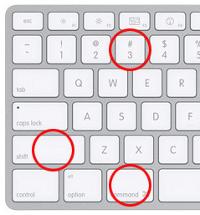
ii) Power on Mac Mini wait a second and hit command key (Apple key) + s and hold them down until you enter the single user mode.
iii) Type “mount uw /” and hit return (don’t include the “”)
iv) Type “cd system/library/displays/overrides” and hit return (don’t include the “”)
v) Type “rm -R D* and hit return (don’t include the “”)
vi) Type “Reboot” and hit enter (don’t include the “”)

These actions will remove the stored display settings, and when you reboot, OSX should repopulate with standard settings, bringing your screen back to life, at least that’s how it worked for me.

e) Using the Apple Supplied DVI to VGA converter, plus a VGA to VGA cable didn’t display any image even in safe mode, most likely due to my monitor only supporting strange resolutions using VGA -1366 X 768). Eventually i got my VGA cable working perfectly. It wasn’t easy, and was a matter of much trial and error, but by installing a trial version of VNC on my Mac Mini, whilst connected using the DVI to HDMI cable, and installing another trial version on my wife’s Macbook, I was able to remotely connect to my Mac Mini, switch the DVI to HDMI cable to the VGA (using Apple supplied DVI to VGA converter), and play around with the Display settings on the Mac Mini via the Macbooks remote connection, until I got the resolution working. In the end it wasn’t just the resolution that was causing the problem, it was also the Hz which needed to be set to 60hz, I’ve settled on 1280 X 768 res for now. I will play around with the resolutions more in the future, as i’d like to eek a little more out, but for now i need to get on with setting up the software. One thing to note. During the boot sequence my screen remains black, and only displays the image once its completed OSX startup, problably because this is when my selected settings are forced into action. I will work on getting this resolved too.

Step 4. Software Setup.

As i stated previously this Mac Mini is my main computer, so i want to run all my everyday software and watch my movies, play my music etc. I can only recommend you all visit this site: http://www.opensourcemac.org it is a great place to get started with your software needs. I will be listing and testing software during the next few weeks, however so far my Mini is managing to keep up with all the tasks i’ve thrown at it. The Core 2 Duo CPU seems very capable.

Parallels 3.0

Awesome doesn’t come close. So easy to setup and use and Vista runs like a charm. If you only plan to dip into Vista or XP occationally then use Parallels. The Core 2 Duo is very capable of running OSX and Vista at the same time, and i was able to troubleshoot a very annoying issue with folder permissions being locked on my external drives (only way to fix this was to make a copy of the folder in OSX, boot Vista and delete the original folder). I use Vista to troubleshoot my OSX migration issues, and because Parallels automatically maps your OSX local folders in Vista, you can easily copy accross any work between the systems.

Step 5. Summary and Conclusions.

The setup of the Mac Mini was complicated by the lack of support for my JVC LCD TV, although it displayed an image using the DVI to HDMI cable, i wasn’t satisfied with the quality of the image. I knew from my previous PC setup that the VGA cable would provide a better image, and yet it took some serious effort to get the VGA cable working with the Mini. Not everyone has had these problems, but from what i’ve read in the troubleshooting forums, it seems to be a regular issue. For this reason i cannot recommend the Mac Mini as a Media Center for the average consumer. The Apple TV no doubt provides much better LCD TV support, and if surfing the Internet or reading your email doesn’t need to be done from your LCD TV then it must be better choice for you.

If you are metaphorically prepared to get your hands dirty, then the Mac Mini is proving to be a most excellent Media Center. The wonderfully rich OSX experience means i’m never far away from my media and applications. I firmly believe that the HD TV should be connected to a fully functional computer, unfortunately most consumers are not prepared to mess around with VNC inorder to get their display working.